لم تتم ترجمة هذه الصفحة بعد — يتم عرض النسخة الإنجليزية.
Undo changes the assistant made
Undo all prepares a card that reverses an applied change card. Nothing is reverted until you apply it, and nothing is deleted.
22 نوفمبر 2026
Every change card from the AI assistant can be reversed with Undo all. The undo is a new card: you see what will be put back, and nothing changes until you apply it.
Steps
- On the card you applied, press Undo all.
- The assistant prepares the undo card and shows it below. Nothing has been reverted yet.
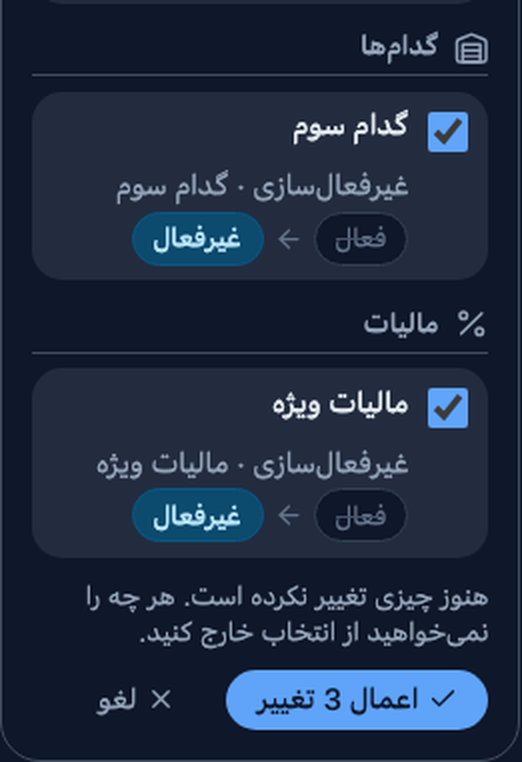
- Check the list and untick anything you want to keep.
- Press Apply N changes. The changes are reversed.
What Undo does
- Modules switched off are switched back on (and the other way round).
- Menus go back to exactly how they were before the card.
- Settings, numbering and print templates get their earlier values back.
- Warehouses, taxes and units that were added are deactivated, not deleted. Renamed ones get their old name back.
Good to know
- Undo is never automatic. You always confirm it.
- If a change cannot be undone, the undo card says so and that change stays as it is.
- If the same thing was changed again after the card, the assistant may refuse to undo that step so it does not overwrite the newer change.
- Each card has one undo.
- Only a person who is allowed to make that change can undo it. For example, undoing a module change needs an administrator.
- You can also ask for a single thing back, such as Switch the Projects module back on. That prepares a normal change card.
- Undo works the same way from the ChatGPT or Claude connector.
هل كان هذا مفيدًا؟