Bu sayfa henüz çevrilmedi — İngilizce sürüm gösteriliyor.
Hide reports and menu items you don't use
Ask the AI assistant to hide menu areas and items you never open. Only the menu changes; nothing is deleted.
22 Kas 2026
A short menu is faster to work with. You can ask the AI assistant to hide the menu areas and items you never use. Hiding only changes the menu. Nothing is deleted, and you can put it back with Undo all.
Before you start
- You can always change your own menu.
- To change the menu of another person or group, you need admin rights to manage access.
Steps
- Click Help at the bottom of the screen to open the assistant.
- Say what you want to hide. For example:
- Hide Loans and Recruitment from my menu
- Hide the Reports menu for me
- This menu has too many options, hide what I don't use
- My cashier only needs Sales and Receipts in the menu
- The assistant shows a card with the menu changes.
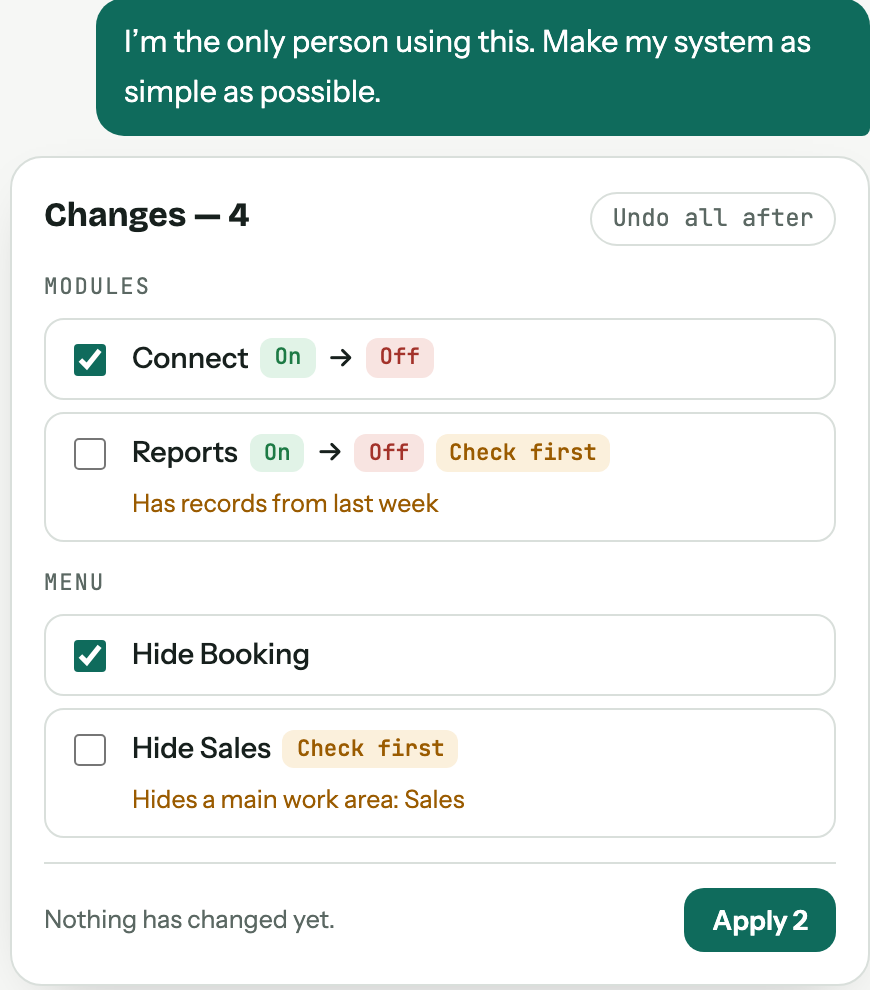
- Untick anything you want to keep.
- Press Apply N changes. Your menu updates.
What starts unticked ("Check first")
- Hiding a main work area, such as Sales.
- Any change to another person's or a group's menu.
These show the reason under the change. Tick them only if you are sure.
Tips
- To clean up more than the menu, ask a bigger goal: Make my system as simple as possible. The card can then also suggest switching off modules you don't use.
- Hiding an item from the menu does not remove anyone's permission. To change what someone may do, ask an admin who manages access.
- Changed your mind? Press Undo all on the card and apply the undo. Your menu goes back to how it was before.
Bu faydalı oldu mu?