Set up warehouses, taxes, units and document numbering with the assistant
Add or rename warehouses, taxes and units, change number prefixes and the default print template from one assistant card.
Nov 22, 2026
The AI assistant can prepare the basic setup of your business in one card: warehouses, taxes, units of measure, document numbering and the default print template. You check the card, press Apply, and can reverse it with Undo all.
Before you start
- You need to be an administrator of your business.
- Have the names ready. For a new tax, know the rate.
Steps
- Click Help at the bottom of the screen to open the assistant.
- Ask for one or several things in one message. For example:
- Create a warehouse "Second Store", a 10% tax for sales and purchases, and invoice numbers starting with INV
- Use the compact template for invoices by default
- Add a unit called Carton, short form ctn
- Check the card. Each change shows the value before and after.
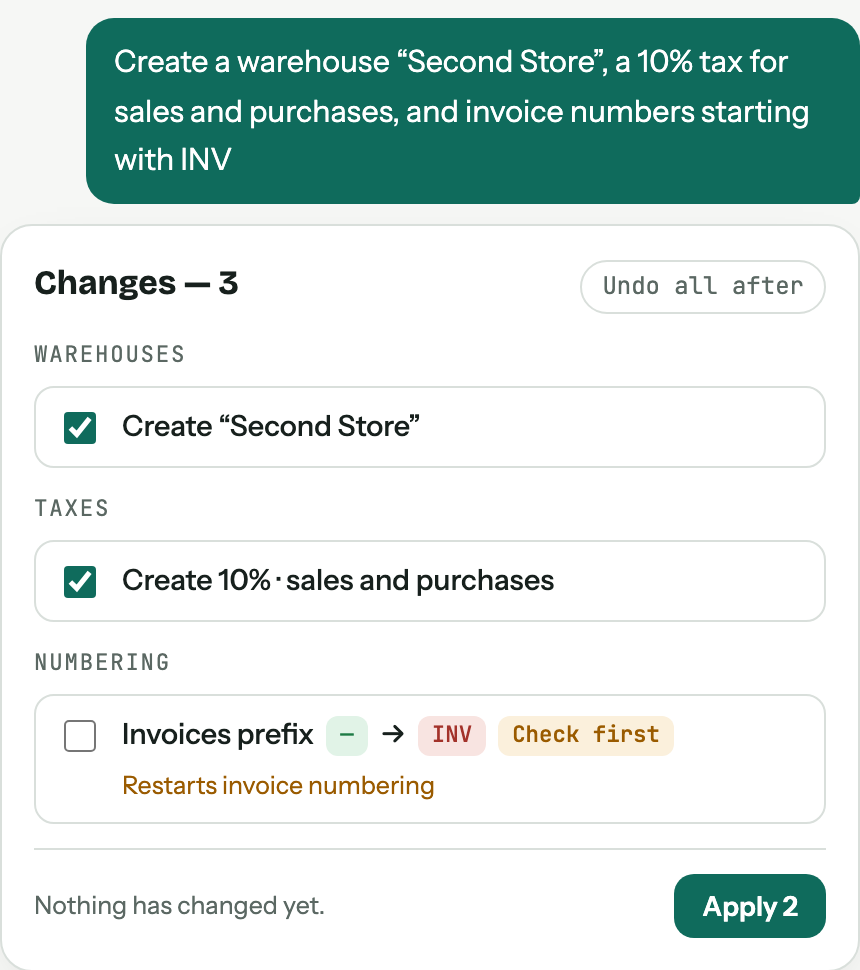
- Untick anything you don't want, then press Apply N changes.
- You can check the result on the usual settings screens (inventory, taxes, document numbering).
What it can do
| Area | What you can ask |
|---|---|
| Warehouses | add, rename, deactivate, activate again |
| Taxes | add (with a rate), rename, deactivate, activate again |
| Units | add, rename, deactivate, activate again |
| Document numbering | the prefix, the number of digits, and whether codes can be typed by hand |
| Print templates | which template a document prints with by default, for the whole business (for example invoices, sales orders, sales receipts, payment receipts) |
Starts unticked ("Check first")
- A new numbering prefix: new numbers start again from 1.
- Deactivating a warehouse that has stock history, or a tax or unit that is already used on records. It stops being offered on new documents.
Good to know
- A tax rate is never edited, because posted documents keep their rate. To change a rate, ask for a new tax and deactivate the old one.
- The default warehouse cannot be deactivated.
- Nothing is deleted. Undo deactivates what was added and puts changed values back.
- Clinical print templates (prescriptions, diagnostic reports) are not changed by the assistant.
- If the print dialog still shows the old template, reload the page.
Was this helpful?